
AUGUST 2006
www.acdsee.com

Welcome to Pics & Tips
We decided it was time to give the Digital Imaging News a fresh new look and design to improve navigation and overall customer experience. So we went back to the darkroom, did some mixing, and came up with this new publication, Pics & Tips.
Pics & Tips has a featured photo contest, articles on how to improve your photography, how to get the most out of your ACDSee software, special product offers, and photography events. You'll receive Pics & Tips every two months, so keep your eyes peeled for great content coming your way!
Remove Color Cast in ACDSee 8
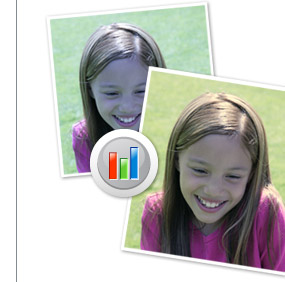
Color casts (tints) are often created in photos when the incorrect white balance is set on the camera, or when the camera's auto white balance fails to detect the correct lighting source to expose the photo. Color casts looks like a tint over the photo and often make your pictures look dull or "off". This article discusses how you can quickly remove a color cast with ACDSee 8 Photo Manager.
To remove a color cast in ACDSee 8:
- In the browser window, select your photo and click the arrow beside the Edit Image button on the toolbar. Choose ACDSee from the drop down menu. This will open the image in ACDSee Photo Manager Edit Mode, which is ideally suited for making quick photo corrections.
- Click Color from the editing tasks panel.
- Click the Color Cast tab.
- To remove a color cast, simply click on an area of the image that is supposed to be white or gray.
- Click Done.
- Click the Save As button on the toolbar at the top of the window to save the file.
Quickly add color casts in ACDSee Photo Editor for creative effect.
Often times when digital scrapbooking and creating compositions for stylistic effect you may want to add a color cast effect to your photos. This article shows you how to do that quickly and easily using ACDSee Photo Editor.
To add a color cast in Photo Editor:
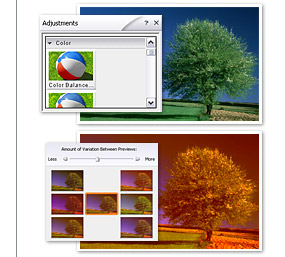
- In the browser window, select the photo and click the arrow beside the Edit Image button on the toolbar. Choose ACDSee Photo Editor from the drop down menu. This will open the photo in ACDSee Photo Editor, which provides some more advanced photo correction tools.
- In the Adjustments menu, select Color, then Color Balance.
- In the panel on the right of the screen, you will see color cast variations.
- Simply click one of the color variations that you like, and a new set of variations will automatically be presented. You can continue this process until you find a color tint that you're happy with.
- The color balance window gives you a before and after view of the photo to help you compare the changed photo with the original.
- Click OK, when you're satisfied with the color.
- Click the Save As button from the file menu to save the file.
Adjusting Colors on Your Camera
People respond to colors emotionally. Green can be invigorating and convey a sense of growth, red can be exciting and powerful, blue can stir melancholy, and yellow can convey a sense of calm and warmth.
The colors in your pictures are no different. The more control you have over them, the more impact they'll have on the people you show your pictures to. Today, most digital cameras (as well as printers and scanners) automatically adjust colors. If you're a hands-on type and would like to experiment more with the colors on your camera, you can choose from two different settings-vivid colors and natural colors.

Natural vs. Vivid Color
The natural colors setting is suited to shots where the actual color of a subject is important, such as documenting visual facts. But when you're photographing your garden, your child, a family picnic, you might want to use the vivid color settings to enhance the colors your camera renders. Vivid colors can give you just enough extra visual punch to turn what might have been a drab looking picture into something truly special.
Saturation
If your camera doesn't have a vivid color setting, you can always get a similar effect by adjusting your camera's saturation. Saturation refers to the measure of intensity or strength of color in a photograph. It's best to increase the saturation after you've adjusted brightness and color balance with a black and white image.
Depending on the camera model, saturation will provide you with greater control than the vivid color option, because rather than just turning on vivid color, saturation is often adjusted according to exact amounts of color intensity.
Here are some quick additional color tips:
- Consider your light source. Every light source has a different impact on how a camera captures the color of a scene, which can create photographic color shifts. Take that into account when you shoot - whether it's natural or artificial light, soft or strong, the direction of your lightsource, etc.
- Check white balance. You can't ALWAYS trust the auto white balance setting on your camera, so it's helpful to learn how to set it manually.
- Check light settings. Digital cameras have preprogrammed settings for specific lighting situations, such as daylight, fluorescent, and tungsten, which will often work well in correcting environmental color shifts.
- Check color mode. If your photos are intended only for display and the Web, you can set your camera to the sRGB color model. If your camera has Adobe RGB, use it for photos intended to be printed, or when you aren't sure what you'll be doing with the picture.
- Try new modes. Vivid colors, contrast, saturation, black and white, sepia, and other color modes and controls offer interesting creative opportunities for experimenting with color in your photos
Featured Creative Family Photo
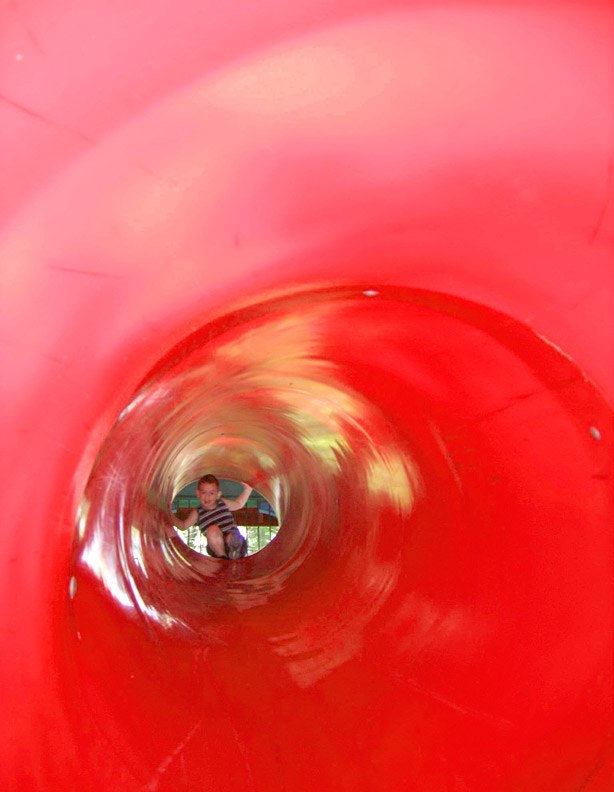
Gerry Poling, Thunder Bay, Ontario, Canada
By standing to the side of the tunnel slide at Santa Village in Bracebridge Ontario, and reaching into the tunnel with my digital camera, I was able to capture this photo of my partner's grandson Nathan Vos, 4, of Barrie, Ontario, which produced some rather unique results.
Next month's Featured Photo theme:
Speed
Send submissions to:
featuredphotos@acdsee.com
Photography Events

photokina
September 26 - October 1, 2006 - Cologne, Germany.
http://www.photokina-cologne.com/
With its new products, innovative ideas and pioneering technologies, photokina is the global business and communication platform for the imaging sector.
At photokina, the focus is on image communication. The event is an impressive presentation of the shared future of photography, IT and telecommunications. Imaging is more - and that also applies to photokina 2006. The fair's structure, which is based on an imaging workflow, permits an integrated presentation of the topics of image capturing, image storage and processing, image transmission and service, image output, equipment and supplies.
photokina makes connections clear for consumers and professionals alike. Its strength and expertise lies in its presentation of entire value chains. The unique breadth of photokina's offerings throughout its more than 50 years in the business have given it an unmistakable character and a dynamism of its very own.



ACDSee™ Photo Editor + PANTONE® huey
True colors. True creativity.
ACDSee Photo Editor:
Be creative with your photos and learn how to get the best results in the shortest number of steps. Get the tools and clear instruction you need to turn your digital pictures into something truly memorable - photos that will last a lifetime.
Photo Editor actually teaches you how to make the creative changes you want, like adding Lens Flare, Glowing Edges, Oil Paint, and a ton of other cool effects that are a cinch to apply. It also gives you creative project ideas, and shows you the steps and tools you need to turn them into a reality.
PANTONE huey:
There's a reason your blues aren't always true. Same goes for your reds, greens and every color in-between. What you're seeing onscreen isn't necessarily accurate - it all depends on your monitor. huey is an easy-to-use monitor color correction tool that automatically adjusts the color of your monitor so what you're seeing is spot on.
huey can even make further adjustments to your monitor to compensate for changes in the room lighting. Everything becomes more accurate: digital photos just as you remember the scene, game graphics that give you the intense edge you're after, movies with brilliant life-like color and a Web-browsing experience that delivers colors that you can trust.