OCTOBER 2006
www.acdsee.com

Auto Categories in ACDSee 9
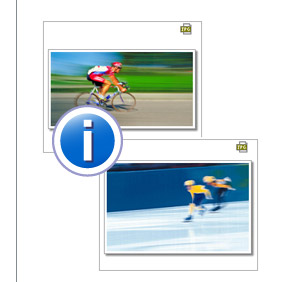
Auto Categories take the pain out of organizing your photos by doing it for you. When Getting Photos from your camera or storage device, ACDSee Photo Manager automatically puts your photos into convenient categories based on EXIF camera information, IPTC data, ACD database information, and file properties.
In the ACDSee browser ensure the Organize Pane is open by selecting View, then selecting Organize. Auto Categories is listed below the Ratings display in the Organize Pane.
- To use Auto Categories, select the + sign beside Image Type to expand the list.
- Then, select JPEG to view all of your JPEG photos.
- If you have photos taken at various aperture or ISO settings, you can quickly retrieve these using Auto Categories.
- You can also use the easy select bar to display more than one auto category,and even combine your search using ratings and categories that you have assigned.
*Note: You will need to catalog your photos prior to using Auto Categories so that the photo properties are stored in the ACDSee database. To catalog your photos select Database and then Catalog Files and follow the wizard.
Motion Photos
Motion photos can spice up your collection with dramatic effect, adding an element of the extraordinary to everyday events.
There are two main types of motion photo – blurred and frozen, both of which are determined by your camera’s shutter speed. The faster your shutter speed the more “frozen in time” the subject appears. Conversely, the slower your shutter speed, the longer your lens’s exposure, and the more motion captured in the form of blurred streaking lines.
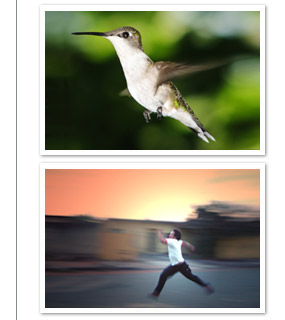
Freezing an object
With a faster shutter speed and shorter exposure time you can get some really cool shots. For example, you might want to take a picture of a hummingbird and capture the bird on film as if it were “frozen in time”.
Try playing with your camera’s manual mode, adjusting the shutter speed, and taking lots of different shots of your subject. Through trial and error you’ll learn how to get the frozen motion effect, which is great for capturing energetic moments with clarity and precision.
Blurring an object
Imagine you’re watching your son sprinting. As he’s running you snap a few shots. If you’ve used a slower shutter speed, his movement will come out blurred in the photos, making him look like he’s moving with supernatural speed. (note**A slower shutter speed can be achieved by holding down on your camera’s trigger button.)
Let’s look at another example – you’re attending your daughter’s show-jumping competition. You want to blur the background while keeping your daughter and her horse in focus. To do this, you can set your camera to a slower shutter speed, pan your camera in a such way that it follows your daughter as she moves through the course – all the while keeping her framed as best as possible. Then, shoot your photo as you pan. It might take several tries, but the result will be a photo of your daughter that is in focus while the background behind her is blurred.
Featured Speed Photo
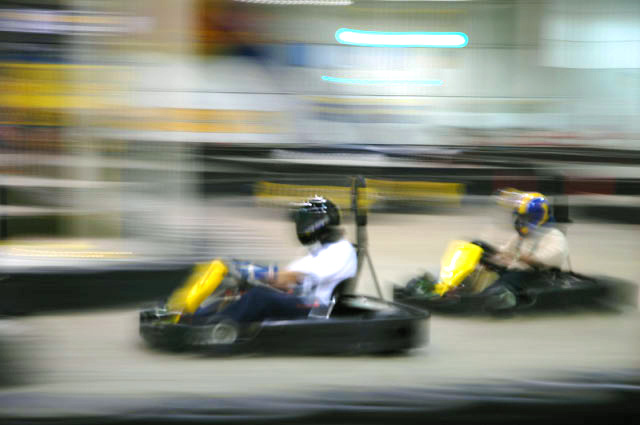
Erika Schick:
This photo was taken at an indoor go-cart arena with a Nikon D70 camera, exposure time 1/6 sec, F-stop f/4.5, and a focal length of 70mm.
Next month's Featured Photo theme:
Giving
Send submissions to:
featuredphotos@acdsee.com
Photography Events

Photokina 2006 Wrap-Up
We recently showcased our new ACDSee 9 Photo Manager and ACDSee Photo Editor products at Photokina in Germany. There were over 4,000 visitors to our booth, and more than 68 reporters attended the ACD press conference eager to hear about the new products and witness the live demos. All in all, the show was a tremendous success. Visitors were amazed by how fast and easy ACDSee makes it to organize, browse, and view photos, while Photo Editor lets everyday photo lovers to be creative with their collections.
Photokina had an astounding turnout this year, with 1,600 suppliers exhibiting from 50 countries, and 160,000 visitors from 140 countries. The show, which ran from September 26th to October 1st, was held in Cologne in the new exhibition center there, which is one of Europe's most modern trade fair locations. Hundreds of new products including cameras, lenses, software, and other accessories were on display throughout the week.
For all the juicy details visit the Photokina blog at http://www.photographyblog.com/photokina_2006.php
Photography Events

Photoplus 2006 Looking Ahead
You’re invited to attend the annual PhotoPlus Expo 2006 at the Jacob Javits Convention Center in New York City. We will be manning booth 1212 at the show from the 2nd to the 4th of November.
We’ll be showcasing our powerful professional workflow tool, ACDSee Pro Photo Manager. Visit this link (http://www.photoplusexpo.com) for all the information and be sure to come check us out in The Big Apple.
Award winning professional photographers Neal Clipper from Palisades Park, NJ (http://www.abbeyphotographers.com) and Onne van der Wal, from Newport, RI (www.vanderwal.com) will be present in the ACDSee booth to discuss how they use ACDSee Pro Photo Manager in their daily photography workflow.
PhotoPlus Expo is designed for professionals in the photographic and imaging industries, and offers over 100 photography and design seminars and hands-on workshops taught by world-renowned experts.


BONUS: Receive a free myPIXmania plugin, plus 50 free prints for new myPIXmania members.
myPIXmania. Store your photos online, share your photos with your friends, order prints, and have them delivered right to your door. Create unique photo gifts with over 100 products to personalize, including mugs, books, clothes, watches, posters and more!
*Note to North American customers: Since myPIXmania is a European service, any prints or other photo offers you would like to purchase will be done through myPIXmania in the United Kingdom. That means your transaction will be in British ₤, and delivery will take longer than for European customers.



ACDSee™ 9 Photo Manager + ACDSee™ Photo Editor
Organize and view your photos. Share your world. ACDSee 9 Photo Manager
Take that growing stack of photos on your hard drive and organize them to a T. Find, browse, enhance, and share your digital photos like never before – with stunning speed and ease.
Creative ease. Photo perfection. ACDSee Photo Editor
Once you’ve done the legwork in ACDSee 9, take your collections into Photo Editor and get ready to sprinkle on some creative spice. Use Photo Editor’s easy-to-follow How-tos that guide you through the creation of amazing photo projects like scrapbook pages, calendars, cards, portraits and more.