HOLIDAY 2006
www.acdsee.com

Lifecast: Life lived, life captured, life shared.

Chances are that you or someone in your family loves telling stories. And that’s what Lifecast is all about.
Lifecast helps you combine the natural story-telling power of words and pictures, using fun and creative tools in a relaxed, easy-to-navigate environment. With Lifecast you can create your own online circle-of-friends and share your life’s passions through the power of digital story-telling.
It’s about more than just photos. It’s about the whole experience of telling a story – the sights, the sounds, all the amazing details that make our stories rich.
From summer vacations and family events, to your prized shots of landscapes and dream destinations, Lifecast helps turn your photo album into a living story. But it doesn’t end there; in fact your photos are really just the beginning…
Lifecast is a place where you and your whole family can share thoughts, memories, impressions, important events and crazy experiences with friends and loved ones in a way that is much more compellingly than just flipping through a photo album, or e-mailing sets of photos. That’s because Lifecast allows you to dynamically upload pictures, video and audio, then easily combine all three with text in a way that makes your stories come alive.
Joining is free and Lifecast will offer its members a growing selection of powerful tools to enhance your story-telling experience in the coming months. Lifecast will also provide generous and secure photo storage for your image collections, so you won’t have to worry about losing any important pictures, or sharing them with anyone you don’t want to.
With the holiday season just around the corner, we encourage you to capture your life on camera and then get online and tell your stories using Lifecast. And when the holiday celebrations come to a close, you can expect to see many more intriguing stories with our $10,000 storytelling contest early in 2007. Will some of those be yours?
Share your story. Share your life.
We invite you, as an ACDSee customer, to visit lifecast.com and sign-up to be among the first to experience Lifecast when it goes live.
Ideas for Taking Holiday Shots
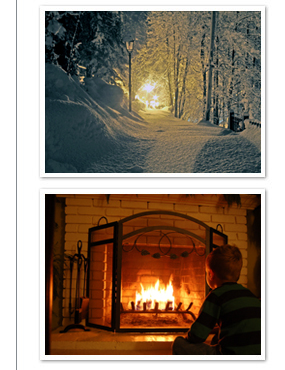
It really doesn’t take much to get the holiday shots you want. A little preparation and some basic camera know-how can mean you get double the number of great shots this holiday season. Here are six quick-and-easy tips you can use to improve your digital photos, on the spot:
- Remember to always use a flash when you’re shooting indoors. It really can make the difference between a great photo and one that has a serious color cast, or is very dark and blurry. Most flashes work best at 2 to 3 meters so keep that in mind when you shoot.
- Set your digital camera to its highest resolution. You’d be surprised how many people shoot at a low resolution and don’t know why their pictures are turning out fuzzy.
- To avoid red-eye (one of the most common photo problems there is) make sure you turn on your camera’s red-eye reduction. On most cameras it appears as an alternate flash setting. The red-eye reduction works by emitting a volley of pre-flashes so your subject’s pupils dilate before the actual shot is taken – reducing the amount of reflection produce when the eye is hit with a burst of light.
- When you’re shooting at night, turn on the Night Mode feature with your flash. This mode lengthens the interval that the shutter is open and will help you capture the warmth of holiday lighting or candles in the background.
- Use a tri-pod if you have one or are interested in learning. They prevent motion blurring and are a great way to expand your photography skills. Using a tri-pod makes it easier to set up group family photos and photos of local scenery.
- Invest in a large memory-card so you don’t have to worry about maxing it out before you’ve gotten all the shots you want. This will save you a lot of headaches!
Fix Bad Holiday Photos with Photo Editor
ACDSee Photo Editor can quickly fix all your holiday photos that went wrong.
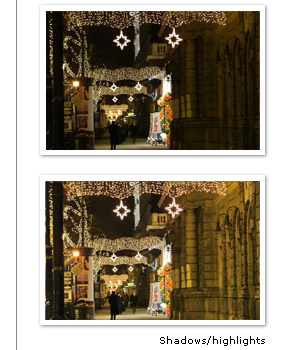
Fade to Black
Shots taken under holiday lights make for some of the finest memories. The problem is night-time backgrounds can mean that the digital camera picks up the colorful lights, but leaves people and backgrounds in the dark. To bring back the background on a dim photo, use Photo Editor to adjust the shadows and highlights in the overall image to find a balance of darks and lights.
Get Rid of Green-eye
A close cousin of red eye in humans, green eye occurs when the camera’s flash reflects off a pet’s eyes. Using Photo Editor, all you have to do to fix this problem is to select the neon-colored areas in the eyes and paint them a darker shade.
Shake the Cold
Another common complaint with family photos at the holidays is the cold. Cold weather means wind-burned cheeks and runny noses that can ruin otherwise merry photos of loved ones. With Photo Editor you can wipe away those nasty “distracting elements” by selecting the area and brushing natural color over top.
Eliminating Garish Colors
In winter, not only is the sun lower and the days darker, but holiday activities are often done against a backdrop of reflective white snow. Digital cameras will base their exposure from the surrounding snowy landscape, dramatically changing the colors of people and clothing – resulting in a much different picture than the memory you were trying to capture. As with lightening a snow-burned cheek, Photo Editor allows you to select an item of clothing or a color that looks off, and adjust its red or blue hue instantly.
Unintended Elements
When reviewing family photos, sometimes unintended elements can ruin an otherwise perfect composition. For example, a light socket on the wall might distract from a picture-perfect photo of a child opening a holiday gift. With Photo Editor you can pick up the color of the surrounding wall and simply wipe away the light socket or other distracting elements, while preserving the background of the photo.
Photography Events
PhotoPlus Expo Wrap-Up
The ACDSee team recently attended Photoplus in New York City, a three-day show held at the Jacob Javits Convention Center. The show was a great success, with over 200 leading manufacturers and suppliers and over 25,000 attendees including Professional Photographers, Advanced Amateurs, and photography students.
Our featured product at the show was ACDSee Pro Photo Manager. At the show we announced the availability of a Pro Public Beta RAW Update of 30 new camera RAW formats. Visitors to the booth came to hear about how ACDSee Pro Photo Manager can help streamline their digital photography workflow.
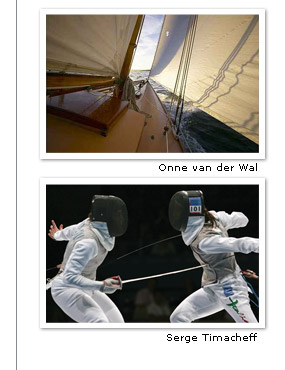
ACDSee hosted several professional photographers in our booth: Onne van der Wal, Nautical Photographer; Neal Clipper, Wedding & Event Photographer; and Serge Timacheff, Official FIE (International Fencing Federation) Photographer. They were able to give booth visitors valuable tips and advice on how to take control of their workflow.